Free Estimate, Invoice & Receipt Generator
Create professional paperwork for your small service business. No signup required.
Create Once. Reuse the Details.
- Create EstimateStart with service details, quantities, rates, tax, and estimate notes.
- Convert to InvoiceReuse customer and line-item details, then enter invoice-specific payment terms and notes.
- Save or Print ReceiptProduce clean paperwork from your browser.
Browser-only • No signup • PDF-ready
Before you start: the form opens with two example lines so the document builds straight away — type over them, or choose a trade to replace them. Clear All Fields, below the form, empties everything.
Loading interactive generator... Please ensure JavaScript is enabled in your browser to build your document.
How To Use This Free Estimate Generator
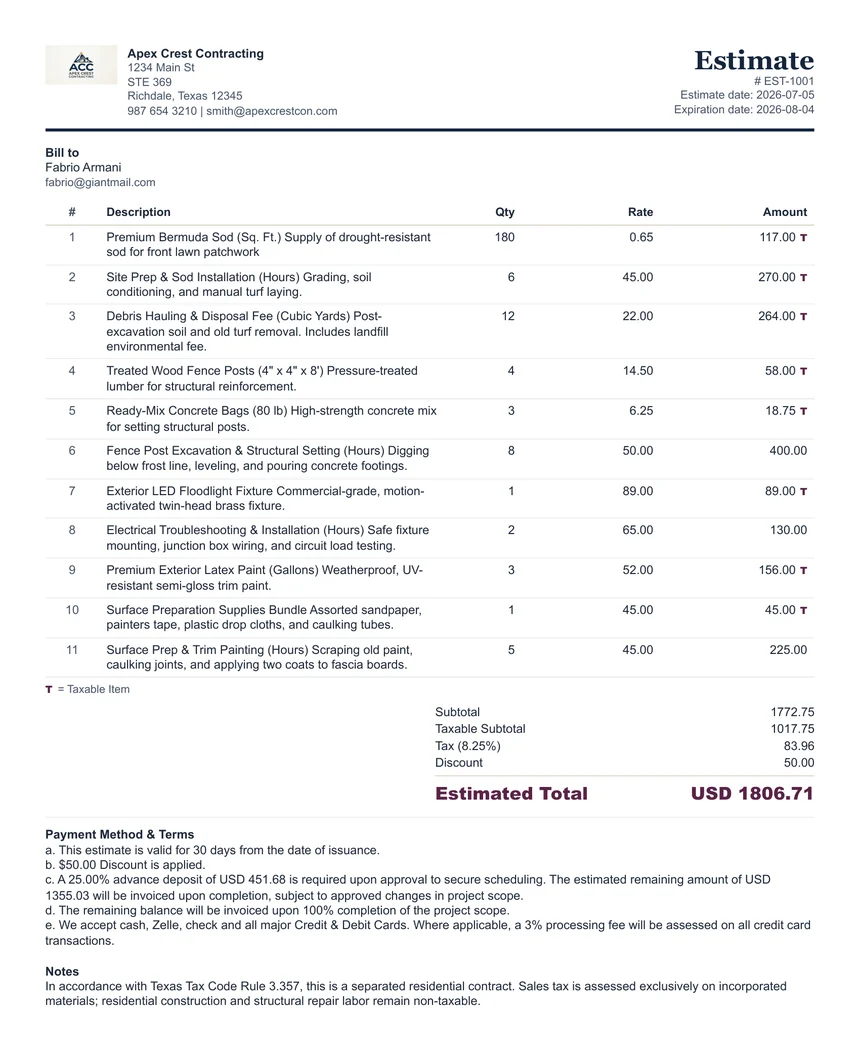
Use this estimate generator before a customer approves the job. It helps you explain the expected scope, proposed price, quantities, rates, optional tax, discount, estimate date, expiration date, and optional advance-deposit wording in one clean document. Use the Advance Deposit Calculator when you need to decide the requested deposit amount or percentage before writing the terms.
An estimate is not the same as an invoice. An estimate communicates a proposed price before work begins. After the customer approves the work and payment becomes due, you can use the built-in Convert To Invoice option to reuse the same browser-based customer and line-item details. Invoice date, invoice payment fields, Payment Method & Terms, and Notes should be reviewed as invoice-specific details.
When To Use It
Use an estimate when a customer asks for a price before approving the service or project.
Scope Clarity
Break the job into clear line items so the customer understands labor, materials, service visits, or package pricing.
Deposit Planning
Use the estimate deposit helper or the Advance Deposit Calculator to prepare optional advance-deposit wording for Payment Method & Terms. It does not reduce the Estimated Total.
After Approval
Convert the estimate to an invoice in the browser when the customer approves the work. The invoice should use its own date, terms, notes, and payment-credit fields rather than carrying estimate wording forward automatically. Nothing is saved to our servers.
Every generator page shows a finished sample document, a field-by-field walkthrough, a start-to-finish worked example, and a plain statement of what is never stored — all readable without running the tool. Every calculator publishes its formula, worked examples, and limitations. Nothing on this site requires an account, and nothing you type is sent to us.
How it works
Add details
Enter your business, client, services, pricing, tax, discount, and payment details.
Preview document
Review a clean professional document that updates as you type.
Save or print
Print directly or save as PDF from your browser.
Business Calculators
Run quick pricing, deposit, tax, and late-fee math before creating your paperwork.
Profit Margin & Markup Calculator
Estimate a client price and net profit from your cost and target margin or markup.
Advance Deposit Calculator
Calculate a requested upfront deposit by percentage or amount and copy estimate wording.
Deposit / Balance Due Calculator
Calculate received deposits and remaining balances before creating invoices or receipts.
Sales Tax Calculator
Estimate tax and final total from a manual tax rate before preparing paperwork.
Late Fee Calculator
Estimate overdue interest only when your payment terms and local rules allow it.
All Calculators
Open the full calculators page for all browser-based math tools.
Who it is for
Templates
Cleaning Service Invoice Template
Recurring cleaning, deep cleaning, move-out cleaning, supplies, flat-rate, and hourly services.
Contractor Invoice Template
Labor, materials, deposits, progress payments, final balances, and change orders.
Photography Invoice Template
Session fees, event coverage, editing, galleries, prints, licensing, and deposit balances.
Consulting Invoice Template
Hourly consulting, strategy sessions, retainers, project deliverables, and meeting time.
Event Vendor Invoice Template
Deposits, remaining balances, event dates, setup and teardown time, overtime, and cancellation or payment terms.
Lawn Care Invoice Template
Mowing, edging, trimming, seasonal cleanup, fertilizer, recurring routes, and one-time yard work.
Handyman Invoice Template
Small repairs, labor hours, materials, trip charges, punch lists, and same-day service.
Mobile Detailing Invoice Template
Wash packages, interior details, ceramic add-ons, travel fees, deposits, and mobile appointment notes.
Moving Service Invoice Template
Hourly movers, truck fees, packing supplies, stairs, mileage, deposits, and final balances.
Paid in Full Receipt Template
Proof of full payment for service jobs, deposits, final balances, cash, check, Zelle, Venmo, or card payments.
Cash Receipt Template
Cash payment proof for contractors, cleaners, movers, vendors, and service workers.
Contractor Estimate Template
Labor estimates, materials, scope details, expiration dates, optional deposits, and project assumptions.
Popular Small Business Paperwork Guides
Plain-English answers on invoicing, deposits, payment terms, late payments, and receipts — written for service businesses, contractors, and freelancers.
What To Include On An Invoice
Use a practical invoice checklist covering business details, customer details, line items, taxable markers, credits, totals, and terms.
Estimate vs Invoice vs Receipt
Know which document to send before work, when payment is due, and after payment is received.
The Clean Paperwork System
The complete workflow for accurate, dispute-proof paperwork — verify, itemize, review, and keep the estimate-invoice-receipt chain unbroken.
Invoice Payment Terms Examples
Copy clear wording for Due On Receipt, Net 15, Net 30, deposits, credits, and recurring service work.
How To Write A Late Payment Reminder
Use polite but direct reminder wording that includes invoice number, balance, due date, and next step.
Should Contractors Ask For A Deposit?
Decide when deposits make sense, how to word them on estimates, and how to show paid deposits on receipts and final invoices.
How To Number Invoices, Estimates, And Receipts
Set up unique, searchable document numbers without reusing or confusing estimates, invoices, and receipts.
What To Do When A Customer Disputes An Invoice
Review the paper trail, correct genuine errors, explain valid charges, and document the resolution.
FAQ
Is ClearPaperwork free?
Yes. The generator is a free browser-based utility with no signup.
Is my invoice stored online?
No. Your details stay in your browser and are not sent to a ClearPaperwork server.
Can I save as PDF?
Yes. Use Save as PDF or Print, then choose Save as PDF in your browser print window.