Free Receipt Generator
Create a professional receipt for paid service work with payment method, payment history, remaining balance, and overpayment credit details.
Before you start: the form opens with two example lines so the document builds straight away — type over them or remove them with the × button. Choosing a trade replaces them with that trade’s typical lines. Clear All Fields, below the form, empties everything including notes and terms.
Loading interactive generator... Please ensure JavaScript is enabled in your browser to build your document.
How To Use This Free Receipt Generator
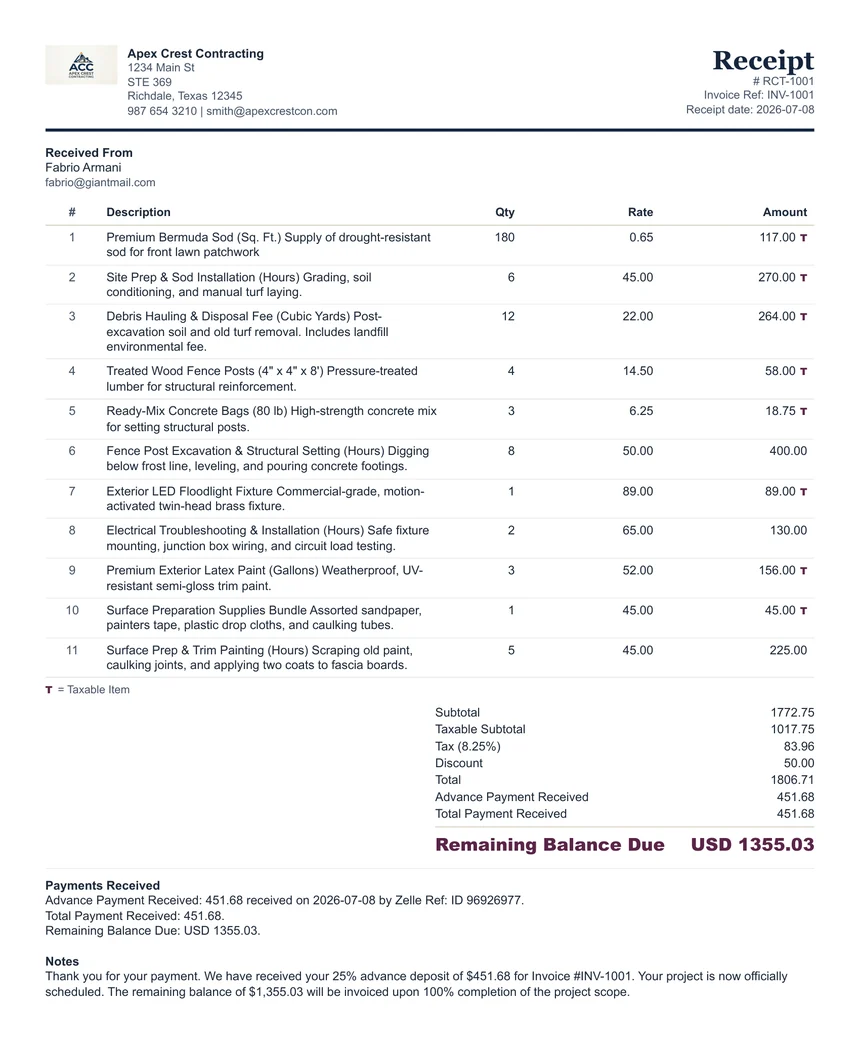
Use this receipt generator after payment has been received. A receipt confirms that money changed hands and gives both you and the customer a simple record of the payment.
The receipt can be used for service payments, partial payments, deposits, final balances, overpayments, credit balances, and paid-in-full confirmations. Keep the wording clear and avoid adding unnecessary internal notes that do not help the customer understand what was paid.
For final-payment receipts, use the final payment date as the main receipt date. The live generator follows the Final Payment Date so a completed receipt is not left with an older invoice, estimate, or draft date.
When To Use It
Use a receipt after payment is received, whether payment was made by cash, card, bank transfer, check, or another method.
Payment Proof
Show receipt number, final payment date, amount paid, customer name, service description, and payment method.
Partial Payments
If the payment does not close the full balance, use the payment history and balance fields to make the remaining amount clear.
Credits & Records
If the customer paid more than the receipt total, show the credit / overpayment balance, then print or save a PDF copy for both records.
What A Receipt Should Include
- Business name and contact details.
- Customer name or company name.
- Receipt number and final payment date; the generator uses the final payment date as the main receipt date when the final payment closes the loop.
- Description of what the payment covered.
- Amount paid and payment method.
- Paid-in-full wording only when the customer has no remaining balance.
- Credit / overpayment balance when total paid is more than the receipt total.
A Start-To-Finish Example
- A customer pays 800.00 of an agreed 1,600.00 job by bank transfer on booking.
- You open the receipt generator and enter your business and customer details.
- The receipt number and date go in — receipts get their own sequence, separate from invoices.
- You record the amount received, 800.00, and the payment method, and reference the invoice it relates to.
- Because this is a part payment, the remaining balance of 800.00 is shown on the document so there is no ambiguity about what is still owed.
- A note confirms what the payment covers and when the balance falls due.
- You print to PDF and send it back the same day.
Sending the receipt immediately does more than acknowledge the money — for a booked job it doubles as confirmation that the slot is held, which is the message customers actually want.
Why Same-Day Receipts Are Worth The Two Minutes
In our own operation, the confirmation email that goes out when an advance payment arrives is also the message that confirms the booking. One document does two jobs: it closes the loop on the money, and it removes the customer’s uncertainty about whether they are actually in the diary. It also means that when the final invoice goes out weeks later, both sides already agree on what was paid and when — which is most of what a billing dispute is about.
Receipt Generator Compared With A Word Or Excel Template
| What you need to do | Word or spreadsheet template | This generator |
|---|---|---|
| Show a part payment and the balance still due | Added manually, and often left off entirely | Amount received and remaining balance both appear on the document |
| Keep receipt numbering separate from invoices | Whatever you remember to type | Its own field, so the two sequences stay distinct |
| Reference the invoice being paid | A free-text line you may forget | A dedicated reference field on the form |
| Recalculate after a correction | Re-check the arithmetic by hand | Totals update as you edit |
| Produce a clean PDF | Export and hope the layout holds | Print layout designed for the page |
| Avoid keeping customer payment data on a shared drive | The file sits wherever it was saved | Nothing leaves your browser |
None of this makes word processors or spreadsheets bad tools — they are excellent when you want total control over layout, or when a document has to be archived in an editable format. The difference is that a generator built for one job removes the arithmetic and the formatting from the task entirely.
What Is Never Stored
No account, no login, no server-side record. Customer names, amounts, payment methods, and references stay in your browser while you work, are written only to your browser’s local storage so a refresh does not lose them, and are never transmitted to ClearPaperwork. Clearing your browser data removes them entirely. That matters more for receipts than for most documents, because a receipt names a person and an amount they paid.
What This Tool Does Not Do
- It does not take payments. It records one that already happened.
- It does not track who has paid across several jobs — use a spreadsheet or accounting software, and see the recurring billing guide for a workable setup.
- It does not email the receipt for you.
- It does not calculate interest, refunds, or chargebacks. For balance arithmetic use the deposit and balance calculator.
- It is not a tax record on its own; keep your receipts with the invoices they relate to.
Walkthrough, comparison, and limitations last reviewed by Khurram Naeem Jaswal. Tested in current Chrome, Edge, Firefox, and Safari on desktop, and at 390px on mobile — see how we test. Something wrong? Report it.
Use the generator for the document, then open the related guide or calculator when you need help with wording, deposits, tax amounts, or late-payment follow-up.
FAQ
Can I use this receipt generator without signup?
Yes. It runs in your browser without an account.
When should I give a customer a receipt?
Give a receipt after you receive payment, especially for cash payments, deposits, partial payments, or paid-in-full balances.
Can a receipt show a partial payment?
Yes. Use the line items and payment history to explain what was paid and whether any balance remains. Keep receipt notes separate from estimate or invoice notes so the final receipt wording matches the actual payment record.
Can a receipt show an overpayment or customer credit?
Yes. If total payments received exceed the receipt total, the generator can show a Credit / Overpayment Balance so the extra amount remains visible for refund, credit, or adjustment handling.
Does ClearPaperwork store receipt details?
No. The receipt details stay in your browser and are not saved to ClearPaperwork servers.
Is this legal or accounting advice?
No. It is a practical document tool. Check your own recordkeeping obligations and local rules.