Free Estimate Generator
Create a professional estimate online for service work, then print or save as PDF.
Before you start: the form opens with two example lines so the document builds straight away — type over them or remove them with the × button. Choosing a trade replaces them with that trade’s typical lines. Clear All Fields, below the form, empties everything including notes and terms.
Loading interactive generator... Please ensure JavaScript is enabled in your browser to build your document.
How To Use This Free Estimate Generator
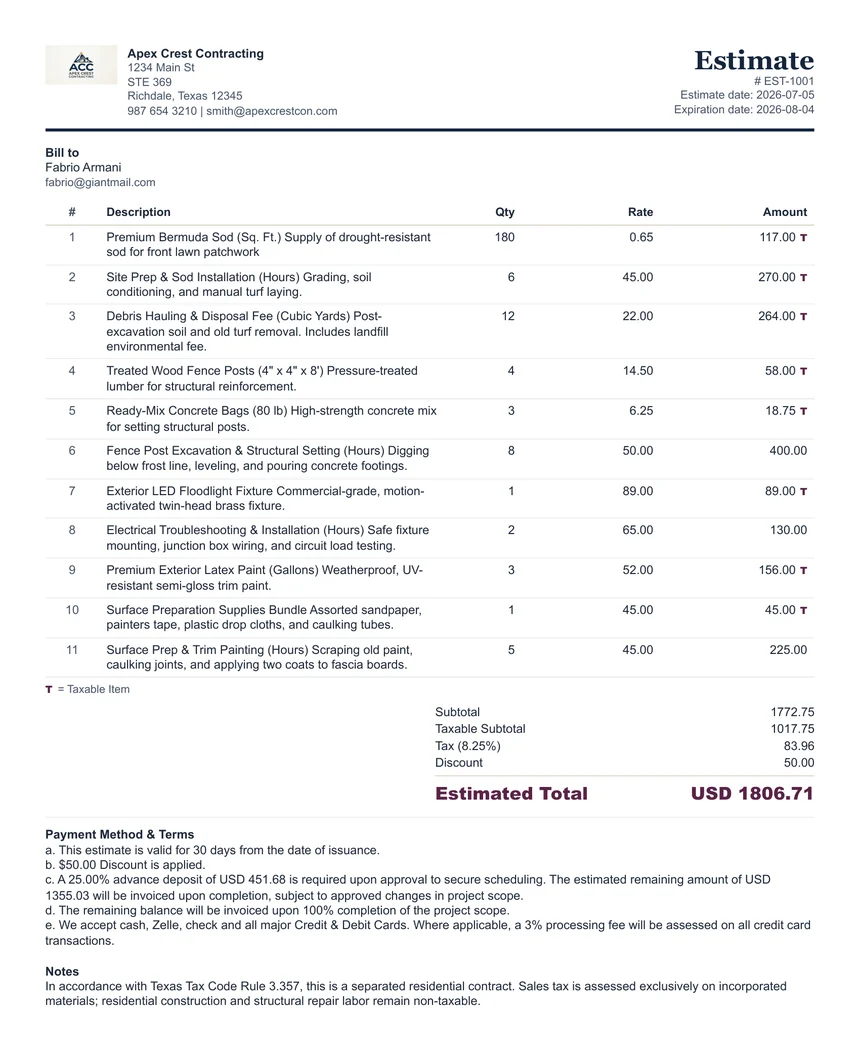
Use this estimate generator before a customer approves the job. It helps you explain the expected scope, proposed price, quantities, rates, optional tax, discount, estimate date, expiration date, and optional advance-deposit wording in one clean document. Use the Advance Deposit Calculator when you need to decide the requested deposit amount or percentage before writing the terms.
An estimate is not the same as an invoice. An estimate communicates a proposed price before work begins. After the customer approves the work and payment becomes due, you can use the built-in Convert To Invoice option to reuse the same browser-based customer and line-item details. Invoice date, invoice payment fields, Payment Method & Terms, and Notes should be reviewed as invoice-specific details.
When To Use It
Use an estimate when a customer asks for a price before approving the service or project.
Scope Clarity
Break the job into clear line items so the customer understands labor, materials, service visits, or package pricing.
Deposit Planning
Use the estimate deposit helper or the Advance Deposit Calculator to prepare optional advance-deposit wording for Payment Method & Terms. It does not reduce the Estimated Total.
After Approval
Convert the estimate to an invoice in the browser when the customer approves the work. The invoice should use its own date, terms, notes, and payment-credit fields rather than carrying estimate wording forward automatically. Nothing is saved to our servers.
What A Service Estimate Should Include
- Business and customer details.
- Estimate number, estimate date, and expiration date.
- Clear description of the proposed service or project scope.
- Line item quantities, rates, and amounts.
- Tax, discount, optional advance-deposit wording, and notes only when they apply.
- Short terms explaining validity period, approvals, and possible scope changes.
A Start-To-Finish Example
- A customer asks for a quote on a one-day job. You open the generator, pick a trade preset if one fits, and the line items load ready to edit.
- You enter your business details once, add the customer, and set an estimate number and an expiration date — say 30 days, so your pricing is not open-ended.
- Line items go in: labour 6 hours at 65.00, materials 240.00, disposal 85.00. The taxable marker goes on the materials line only; labour stays untaxed.
- Subtotal 715.00. You add a 25.00 goodwill discount, and the totals recalculate as you type.
- In the notes you state the arrival window, the expected finish time, and what happens if the scope turns out larger than described.
- You print to PDF and email it. The customer approves by reply.
- Back on the page you press Convert To Invoice, and the same details reappear as an invoice — no retyping, nothing rekeyed wrongly.
The whole sequence takes a few minutes and produces two documents that agree with each other, which is the part that matters when someone queries the final bill.
The Scope Lines That Prevent Arguments
The single most useful thing on our own estimates is not the price — it is the paragraph that states the assumptions. Every quote we send names the arrival time ahead of the event start, the expected finish time, and the volume the price is based on, with a request to tell us in advance if it will be higher. It also carries a small stated cushion, so a handful of extra vehicles beyond the estimate costs the client nothing.
The point of writing it down is accuracy, not penalties. In practice we have never billed a client for overrunning — the numbers people give us are close because we asked for them plainly, and our teams are briefed that the stated end time is the end time, and to ask the client directly before staying longer. Put the same assumptions in your notes field and you will spend far less time arguing about a final invoice.
Estimate Generator Compared With A Word Or Excel Template
| What you need to do | Word or spreadsheet template | This generator |
|---|---|---|
| Work out line totals, subtotal, and tax | You maintain the formulas, or add it up by hand | Calculated as you type, per line, with taxable items marked individually |
| Mark some lines taxable and others not | Manual, and easy to get wrong on a mixed job | A per-line toggle; tax applies only where you set it |
| Turn the approved estimate into an invoice | Save-as, then edit every heading and reference by hand | One button; details carry across in the browser |
| Add an advance-deposit sentence | Written from memory each time | Copy-ready wording from the advance deposit calculator |
| Send it as a PDF | Export or print, watching for page breaks | Print to PDF with a layout built for the page |
| Keep customer data private | The file lives wherever you saved or emailed it | Nothing leaves your browser unless you send the finished document |
None of this makes word processors or spreadsheets bad tools — they are excellent when you want total control over layout, or when a document has to be archived in an editable format. The difference is that a generator built for one job removes the arithmetic and the formatting from the task entirely.
What Is Never Stored
This estimate generator has no account, no login, and no server-side database. Your business details, your customer’s details, line items, prices, and notes are held in your own browser while you work and are written only to your browser’s local storage so a refresh does not wipe the page. Nothing is transmitted to ClearPaperwork, nothing is logged against you, and clearing your browser data removes it completely. Any logo you add is read locally and never uploaded.
What This Tool Does Not Do
- It does not send the estimate for you, chase approval, or capture an electronic signature.
- It does not store a customer list or a job history — there is no database behind it.
- It does not decide tax rates or taxability; you supply the rate and mark the lines.
- It does not price the work. Use the margin & markup calculator for that.
- It is not a contract. If a job needs enforceable terms, have them drafted properly.
Walkthrough, comparison, and limitations last reviewed by Khurram Naeem Jaswal. Tested in current Chrome, Edge, Firefox, and Safari on desktop, and at 390px on mobile — see how we test. Something wrong? Report it.
Use the generator for the document, then open the related guide or calculator when you need help with deposit wording, tax amounts, pricing, or late-payment follow-up.
FAQ
Can I use this estimate generator without signup?
Yes. It works in your browser and does not require an account.
Is an estimate the same as an invoice?
No. An estimate is usually sent before work is approved. An invoice is used when payment is being requested.
Can I convert an estimate to an invoice?
Yes. Use Convert To Invoice to reuse the current estimate details inside your browser.
Should an estimate include an expiration date?
Often yes. An expiration date helps protect pricing when material costs, labor availability, or project scope may change.
Is this professional advice?
No. This is a practical paperwork tool. Review your estimate and check local or industry requirements before using it with customers.