Free Cash Receipt Generator
Create a simple cash receipt for cash payments, deposits, paid-in-full balances, and visible cash overpayment credits.
Before you start: the form opens with two example lines so the document builds straight away — type over them or remove them with the × button. Clear All Fields, below the form, empties everything including notes and terms.
Loading interactive generator... Please ensure JavaScript is enabled in your browser to build your document.
How To Use This Free Cash Receipt Generator
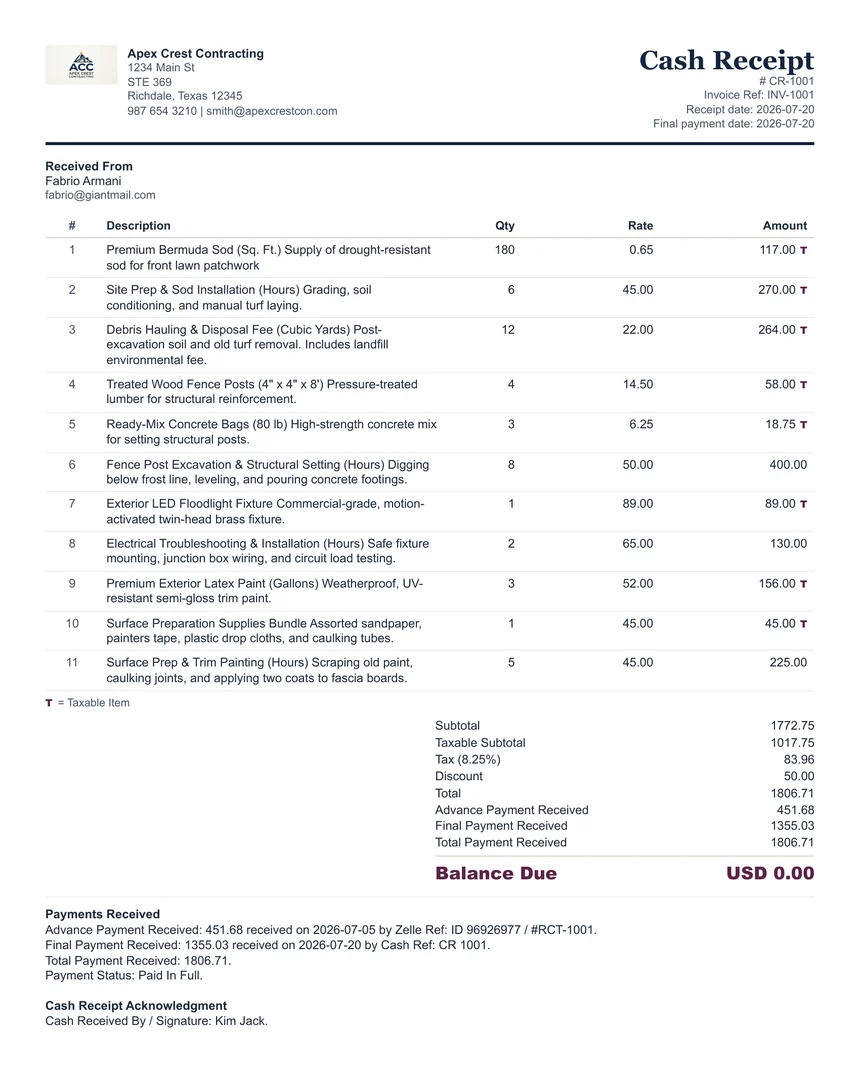
Use this cash receipt generator when a customer pays with physical cash and you need a clear written record. Cash payments are harder to reconstruct later, so the receipt should identify who paid, who accepted the cash, what the payment covered, the payment amount received, and whether any balance or credit remains.
This browser-based tool is useful for cash deposits, partial payments, event services, mobile services, home services, small jobs, delivery payments, final payment balances, and overpayments that need to be shown as a credit / overpayment balance. It does not upload your cash receipt details to ClearPaperwork.
For final payments, the main cash receipt date should match the Final Payment Date. The live generator follows the Final Payment Date so the cash receipt is not finalized with an older invoice, estimate, or draft date.
When To Use It
Use a cash receipt whenever cash is received for a deposit, partial payment, final payment, or paid-in-full service balance.
Cash Details
Include final payment date, receipt number, payer name, service description, payment amount received, and cash method wording.
Deposit, Balance, Or Credit
If the payment is a deposit, partial payment, or overpayment, clearly show the remaining balance or credit / overpayment balance.
Customer Copy
Print or save one copy for your records and provide one copy to the customer when appropriate. Add a receiver/signature name when useful.
What A Cash Receipt Should Include
- Business or payee name.
- Customer or payer name.
- Receipt number and final payment date; the generator uses the final payment date as the main cash receipt date.
- Reason for payment or service description.
- Payment amount received.
- Whether the payment is a deposit, partial payment, paid in full, or overpaid.
- Credit / overpayment balance when Total Payment Received is more than the receipt total.
- Optional receiver name or signature for the person accepting cash.
A Start-To-Finish Example
- A driver completes an airport transfer and the passenger pays 95.00 in cash on the spot.
- Back at a phone or laptop, you open the cash receipt generator.
- Business and customer details go in, along with the date the cash actually changed hands — not the date you got round to typing it.
- The amount, 95.00, is recorded as cash, with a short description of the service.
- A reference number ties the receipt to the job, so it can be found again months later.
- The balance shows as zero, because the fare was settled in full.
- You print to PDF, send the passenger a copy, and keep one for the day’s records.
Cash is the one payment type with no bank record standing behind it, so the receipt is the only evidence either side has. We add a short thank-you line to ours — it costs nothing and it is the last impression the customer takes away.
Why Cash Needs More Paperwork, Not Less
Every other payment method leaves a trail somewhere: a card statement, a transfer reference, a processor record. Cash leaves nothing unless you create it. That is why a cash receipt should be issued at the moment of payment rather than reconstructed later, why it should name the person who handed the money over, and why the date on it should be the date of the payment. If a member of your team collected it, note who — a receipt that cannot be traced back to a person is not much of a control.
Cash Receipt Generator Compared With A Paper Receipt Book
| What you need to do | Word or spreadsheet template | This generator |
|---|---|---|
| Produce a legible copy for both sides | Carbon copy, if the pen pressed hard enough | A clean PDF you can send and archive |
| Add up multiple items and a tax line | Mental arithmetic at the kerbside | Calculated as you type |
| Show that the balance is now zero | Usually implied, rarely stated | Printed explicitly on the document |
| Find the receipt again in six months | Search a box of books | A referenced PDF in your own filing |
| Keep numbering consistent | Whatever the book supplies | Your own reference scheme, applied deliberately |
| Avoid storing customer details on someone else’s server | Not an issue on paper | Not an issue here either — nothing leaves your browser |
None of this makes word processors or spreadsheets bad tools — they are excellent when you want total control over layout, or when a document has to be archived in an editable format. The difference is that a generator built for one job removes the arithmetic and the formatting from the task entirely.
What Is Never Stored
Nothing you type is transmitted or stored on our side. The details live in your browser and in your browser’s local storage while you work, so a refresh does not lose them, and clearing your browser data removes them. There is no account and no server-side copy of who paid you what.
What This Tool Does Not Do
- It does not replace a cash-handling procedure. Who may collect cash, how it is counted, and when it is banked are your controls, not the document’s.
- It does not track a cash float or a daily takings total.
- It does not decide whether tax applies to the sale.
- It does not report anything to a tax authority — keep the receipts with your records.
- The trade preset dropdown is deliberately absent here, because a cash receipt records a payment rather than quoting a job.
Walkthrough, comparison, and limitations last reviewed by Khurram Naeem Jaswal. Tested in current Chrome, Edge, Firefox, and Safari on desktop, and at 390px on mobile — see how we test. Something wrong? Report it.
Use the generator for the document, then open the related guide or calculator when you need help with wording, deposits, tax amounts, or late-payment follow-up.
FAQ
Can I use this cash receipt generator without signup?
Yes. It works in your browser without an account.
Should I give a receipt for cash payments?
Usually yes. A cash receipt creates a simple record for both the business and the customer.
Can this show a cash deposit?
Yes. Enter Advance Payment Received separately from Final Payment Received so the printed receipt shows the payment history and any remaining balance clearly. Cash receipt notes and terms should be written separately from invoice or estimate wording.
Can this show a cash overpayment or customer credit?
Yes. If total payment received exceeds the receipt total, the generator can show a Credit / Overpayment Balance so the extra amount is visible for refund, future credit, or adjustment handling.
Does ClearPaperwork store cash receipt details?
No. The details stay in your browser and are not uploaded to ClearPaperwork.
Is this accounting advice?
No. This is a practical paperwork tool. Check recordkeeping and tax rules that apply to your situation.