Paperwork is not administration. For a service business, it is the payment system. Every day between "job finished" and "money received" is usually a paperwork problem: a missing detail, a vague line item, a balance the customer cannot verify. Clean documents get approved faster, paid faster, and questioned less.
This guide gives you a complete working system for producing accurate, professional paperwork using nothing more than a browser and a disciplined routine.
The Anatomy Of A Document That Gets Paid
Every estimate, invoice, or receipt must answer three questions the moment the customer opens it. If any answer is unclear, payment slows down.
1. Identity: Who Is This Between?
- Your business details: use your business name exactly as it appears on your bank account, business cards, and payment apps. If a customer pays "Joe's Lawn Service" but the invoice says "J. Martinez Landscaping," you have created your own reconciliation problem, and given the customer a reason to pause.
- The customer's details: full name or business name, service address, and a contact method. For property services, the service address is not optional. It ties the paperwork to the actual job when the billing address differs.
- Consistency is the rule: the same business name, spelling, and contact details on every document, every time. Inconsistent naming across your estimate, invoice, and receipt is the most common reason customers question otherwise legitimate paperwork.
2. Intent: What Is Owed, By When, And How?
- Every invoice needs a due date. Due On Receipt, Net 15, or a specific calendar date. Never blank. See Invoice Payment Terms Examples for wording you can copy directly.
- State the accepted payment methods: cash, check, Zelle, card, whatever you actually take. Customers delay when they have to ask how to pay.
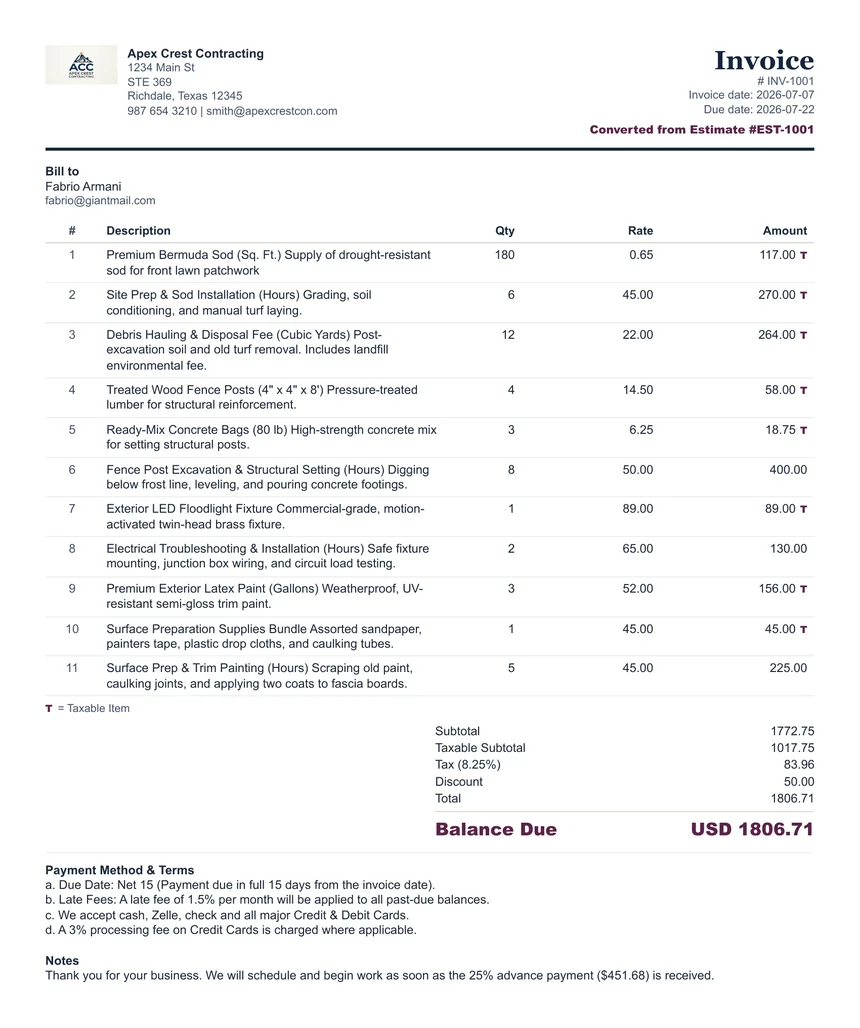
- Show deposits and prior payments. If the customer already paid an advance deposit, the invoice must show the full amount, the deposit credited as a payment, and the remaining balance due. An invoice that ignores a deposit the customer remembers paying will be challenged, and correctly so.
- Mark what is taxable. When only part of a job is taxed (materials but not labor, for example), flag the taxable line items so the tax amount is visibly calculated from the taxable subtotal, not the whole invoice. A tax figure the customer can verify at a glance is a tax figure nobody argues with.
3. Integrity: Does The Paper Trail Hold Together?
- The invoice should match the approved estimate, with any changes shown as separate, labeled line items, such as an approved add-on or change order. Changes are never silently folded into the original scope.
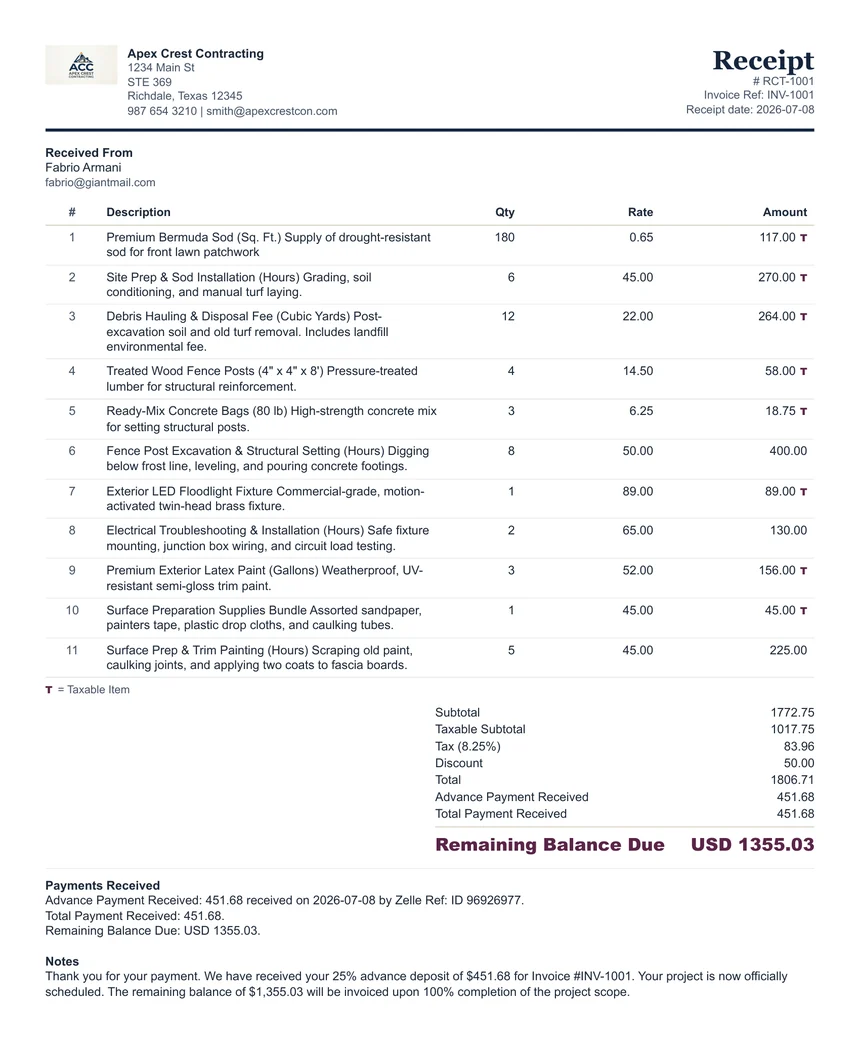
- The receipt should reference the invoice it settles and show the resulting balance, an explicit zero for paid-in-full work.
- Numbers should be sequential and unique: EST-1007 becomes INV-1007 becomes RCT-1007, and next month's job never reuses them. When you convert an approved estimate to an invoice in the generator, the invoice records which estimate it came from. Keep that reference; it is the paper trail doing its job.
For a full breakdown of which document belongs at which stage, see Estimate vs Invoice vs Receipt.
For a document-by-document view of the complete chain, use The Small-Business Paper Trail: Estimate → Invoice → Payment → Receipt.
The Four-Stage Execution Workflow
Professionals do not "fill out an invoice." They run a short, repeatable routine. This one takes under ten minutes per job once it becomes habit.
Stage 1: Verify Before You Type
- Customer name spelled correctly. Check the text thread or email where they hired you.
- Correct service address, especially for landlords, property managers, and anyone with multiple properties.
- The agreed price, deposit arrangement, and any changes approved mid-job, with the date and method of approval.
- Your current rates. The invoice must reflect what you quoted this customer, not your new rate sheet.
The two-minute audit at this stage prevents most downstream disputes. A wrong address, a transposed price, or a forgotten add-on is cheap to fix now and expensive to fix after the customer has the document.
Stage 2: Controlled Data Input
When entering the job into the Estimate Generator, Invoice Generator, or Receipt Generator, input discipline eliminates rework:
- Work top to bottom. Business details, customer details, line items, tax, deposit, terms, notes, in that order. Skipping around is how fields get missed.
- One line item per distinct charge. Labor, materials, trip charges, and approved extras each get their own line with quantity, rate, and amount, plus the correct taxable flag. Bundled, vague lines ("misc work — $450") are the line items customers dispute.
- Plan deposits with real numbers. Work out the advance deposit percentage and remaining amount with the Advance Deposit Calculator before writing it into the estimate terms; reconcile received deposits and balances with the Deposit / Balance Due Calculator. Price the job itself from cost and target profit with the Margin & Markup Calculator, and apply tax correctly with the Sales Tax Calculator.
- Use consistent formats. One date style, one way of writing amounts, on every document. Formatting inconsistencies read as carelessness, and carelessness invites scrutiny of the numbers themselves.
Stage 3: The Review Pass
Never send a document you have not read as the customer will read it. The live preview updates as you type. Use it deliberately, line by line:
- Names and addresses: spelled correctly, right property, right customer.
- Numbers: quantities × rates produce the amounts shown; the subtotal, taxable subtotal, tax, discount, deposit, and balance chain adds up.
- Transposed digits: the classic silent error. $1,240 entered as $1,420 costs you a callback and your credibility, in either direction.
- The one-glance test: can the customer see the balance due, the due date, and how to pay within five seconds of opening the document? If not, simplify.
A written checklist beats memory. The Invoice Mistakes Small Businesses Should Avoid guide covers the full list.
Stage 4: Deliver, Save, And File
- Save a PDF copy before you send anything. The generator runs entirely in your browser and does not store your documents on a server. Your saved copy is the record. Treat it that way.
- Use a consistent filename convention:
2026-07-03_INV-1007_Smith_LawnService.pdfsorts itself by date and finds itself by customer. Random filenames become unfindable by tax season. - Keep one folder per year, or per customer. Either works; mixing systems does not.
- After payment, close the loop with a receipt that references the invoice and records each payment, both the advance deposit and the final payment, with dates, methods, and reference numbers (a Zelle ID, a check number, a cash reference). For cash especially, the Cash Receipt Generator record may be the only proof either side has; the Cash Payment Receipt Guide covers exact wording.
Consistency Rules That Prevent Disputes
- One business identity. Same name, same contact details, on every document and every payment method.
- Sequential, unique document numbers. Never reuse a number; never leave the field blank. Numbers are how you and the customer refer to the job six months later.
- Deposits always visible. Any money already received appears on the invoice as a credited payment: full price, payment, balance. Every time.
- Changes as new lines, never edits. If the scope changed, the paperwork shows the original scope plus a labeled addition. Silently changing a total the customer already saw is how trust dies.
Troubleshooting: When Paperwork Comes Back
| Problem | Likely Root Cause | Corrective Action |
|---|---|---|
| Customer disputes the total | Scope change never appeared as its own line item | Reissue with the original scope and the approved change shown separately, referencing the approval date |
| "I already paid part of this" | Deposit missing from the invoice | Reissue showing the full amount, the deposit credited, and the remaining balance, with an apology; this one is on you |
| Invoice ignored past the due date | No due date, unclear payment method, or simply forgotten | Send a polite, specific follow-up. See the Late Payment Reminder Template and the reminder writing guide |
| Customer's bookkeeper rejects it | Missing detail: no invoice number, no service address, no itemization | Rebuild against the What to Include on an Invoice checklist and resend |
| Tax amount challenged | Taxable and non-taxable items not distinguished | Reissue with taxable line items flagged so the tax visibly calculates from the taxable subtotal only |
| Amount challenged on a cash job | No receipt was issued at payment | Issue a dated cash receipt now with the amount, purpose, reference, and balance; going forward, issue one at every cash handoff |
Escalation rule: if the same customer questions paperwork twice, stop and audit the whole document chain for that job (estimate, approvals, invoice, payments) before responding. Answer with the paper trail, not from memory. The party with the organized records wins the conversation.
Best Practices For Recurring Work
- Reuse verified details. Once a customer's information is confirmed correct, carry it forward exactly. The estimate-to-invoice-to-receipt conversion exists precisely so approved details, line items, and deposit credits flow through without retyping errors.
- Standardize your line item wording. "Monthly lawn service — 4 visits" should read identically in March and in September, for the customer's records and yours.
- State the billing rhythm in your terms. Recurring invoices due within 7 days, first-of-month billing: written on every invoice, so the arrangement never depends on anyone's memory.
- Review rates on a schedule, not mid-job. Rate changes belong on new estimates, announced in advance, never discovered by the customer on an invoice.
Create the estimate, convert it to an invoice when approved, and convert to a receipt when paid. Line items, taxable flags, and deposit credits carry through automatically.
Open Estimate GeneratorSome links may be affiliate or partner links, which means ClearPaperwork may earn a commission at no extra cost to you.
Try Advance Deposit Calculator Try Deposit / Balance CalculatorFAQ
Does ClearPaperwork store my estimates, invoices, or receipts?
No. The generators run in your browser and your document data is not saved on a ClearPaperwork server, so the PDF copy you save is your permanent record, so file it deliberately.
How should a deposit appear across the estimate, invoice, and receipt?
State the required deposit on the estimate, show it as a credited payment on the invoice with the remaining balance due, and record it on the final receipt as part of the full payment history with a zero balance.
What is the fastest way to keep documents consistent for one job?
Use the conversion flow: create the estimate first, convert the approved estimate to an invoice so line items and the deposit credit carry over automatically, then convert to a receipt when the balance is paid.
This guide covers general business organization, not legal, tax, or accounting advice. Requirements vary by location and industry, so verify any rules that apply to your specific business.